
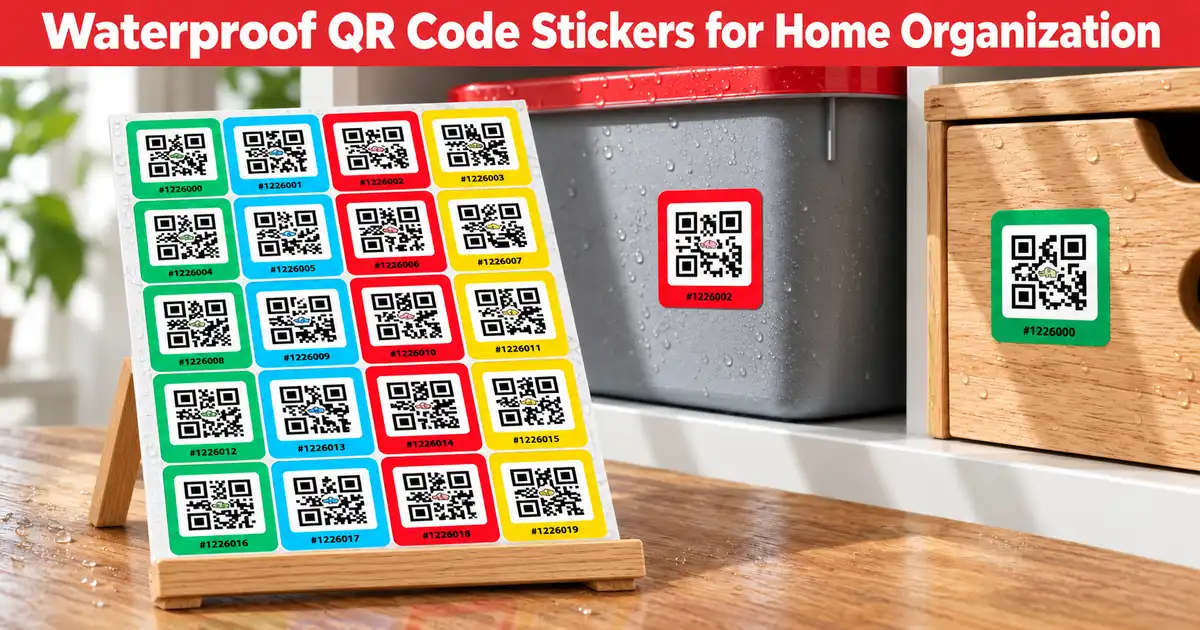
Waterproof QR Code Stickers for Home Organization
Every home has the same problem: a garage full of bins, a closet of mystery boxes, and no idea where the holiday lights went. Handwritten labels smudge, peel, and fade, and they only tell you a few words about what’s inside. Waterproof QR code stickers solve this by linking each container to a digital inventory you can open with your phone.
At Elephant Trax, we built our system around this idea. Here is why QR code stickers work so well for home organization, and how to set up a system that lasts.
Why Handwritten Labels Fall Short
A marker label on masking tape holds about five words. It can’t show a photo, a quantity, or a note about what’s buried at the bottom. Garages, basements, attics, and storage units are also hard on labels. Humidity, condensation, spills, and temperature swings can turn paper tags into curled, unreadable scraps.
Durable QR code stickers fix both problems. The sticker is only an identifier, and the details live in your app. When you move items between boxes, you update the inventory instead of relabeling the container.
How QR Code Stickers Work
The process is simple:
- Label: Put a QR sticker on a box, bin, tote, or shelf.
- Pack: Photograph the items inside and add names, notes, quantities, and keywords.
- Scan: Point your phone at the sticker to see exactly what’s in the box without opening it.
- Find: Search by item name or keyword, and the app tells you which container holds it.
You don’t even have to scan every box. If you remember only that you own a camping stove, a quick search shows its location.
QR Code Labels vs. Traditional Labels
| Feature | Handwritten Label | QR Code Labels |
|---|---|---|
| Information stored | A few words | Photos, notes, quantities, tags |
| Searchable | No | Yes |
| Easy to update | Relabel the box | Edit in the app |
| Shareable | No | Yes, with family or teammates |
| Works for large collections | Poorly | Very well |
QR code labels turn a pile of boxes into a searchable database, which is why they’ve become popular with people who are moving, decluttering, or managing storage units.
What to Look for in Smart QR Labels
Not every sticker is worth buying. When choosing smart QR labels for your home, check these points:
- Durability: Look for labels made to hold up in garages, basements, and storage units. Check the product page for material and finish details before you buy.
- Scan reliability: Clear, high-contrast codes scan faster, even in dim light.
- Unique codes: Every sticker should link to its own record so boxes never get mixed up.
- Strong adhesive: Labels should stick to plastic bins, cardboard, and metal shelving.
- App compatibility: A sticker is only as useful as the software behind it.
Color-coded options are also handy. You might use one color per room, such as green for the kitchen, blue for the garage, and red for seasonal decor, so you can spot a box before you scan it.
Where to Use QR Code Stickers at Home
Garage and basement: Tools, car supplies, sports gear, and paint cans are easy to lose track of.
Closets: Label shelf bins for out-of-season clothes, linens, and keepsakes.
Pantry and kitchen storage: Track bulk items and small appliances.
Attic: Holiday decorations and memory boxes can sit untouched for years, so you need a way to remember what’s inside.
Moving: Label every box once. At the new place, scan to see what’s inside and which room it belongs in, without tearing tape off every carton.
Insurance records: A photo inventory of your belongings can also help if you ever need to document what you own.
Tips for Building a System That Lasts
- Start small. Pick one problem area, like the garage, and finish it before moving on.
- Photograph before you pack. A clear photo of the contents is faster than typing a long description.
- Use consistent keywords. Words like “holiday,” “tools,” or “camping” make searching easier.
- Keep labels in the same spot. Put them on the same corner or side of every container.
- Share access. If your household shares the space, let everyone see the inventory so nobody has to ask you where things are.
- Update as you go. When you move an item, take a few seconds to change its box in the app.
Shop QR Code Labels Made for Organizing
If you’re ready to start, you can shop QR code label packs directly from our store. Elephant Trax sells pre-printed packs in several sizes, including 40, 80, and 160 labels, with color-coded options for sorting by room or category. The packs are designed for storage bins, tote boxes, moving boxes, and general home inventory. Because the labels come ready to use, you don’t need a printer or any design work. Stick them on and start scanning.
Get the Elephant Trax App
The stickers are only half the system. The Elephant Trax app is where your inventory lives. You can add photos, names, quantities, and keywords, and AI-assisted tagging helps make items easier to search later. The app works on iOS, Android, and the web, and there is a free plan, so you can try it before committing to anything. Pro features such as account sharing are available for families and teams who manage storage together.
You can download Elephant Trax from the Google Play Store or the Apple App Store, and the app has strong ratings on both. Once installed, scan your first sticker and you’re ready to catalog your first box in minutes.
Where to Buy: Elephant Trax Store and Amazon
You can order QR code stickers straight from the Elephant Trax online store, or you can find our smart storage labels on Amazon if you prefer to buy there. Either way, you get labels designed to work with the app, so setup is quick. If you’re organizing a whole home, a larger pack saves money and means you won’t run out halfway through the job.
Waterproof QR code stickers won’t sort your garage for you, but they make it far easier to keep it sorted. Label once, scan anytime, and spend your time using your things instead of looking for them.