
How to Create a Simple Home Inventory Organizer System
Keeping track of everything stored around your home can become difficult, especially when boxes, bins, closets, garages, and storage spaces start filling up. You may remember where you placed something today, but months later, finding that same item can mean opening several boxes or searching through crowded shelves.
A simple Inventory Organizer system can change the way you manage household belongings. Instead of relying only on handwritten labels or memory, you can create a digital record of what you own, where it is stored, and how to find it when needed.
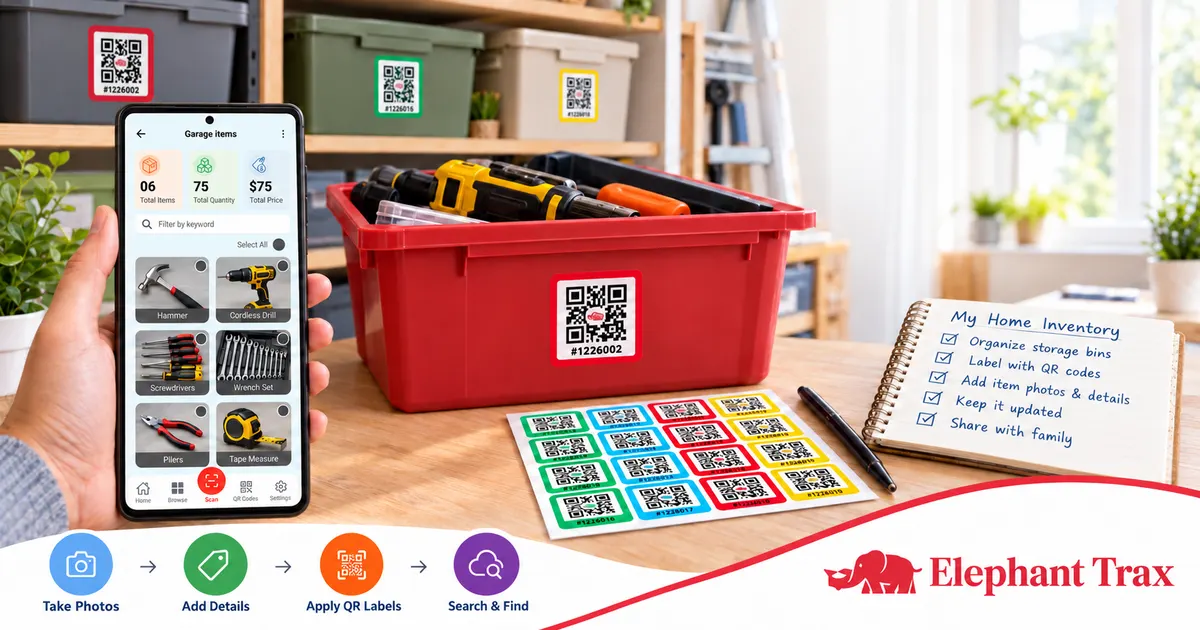
With a system such as Elephant Trax, you can combine photos, item information, searchable keywords, and QR labels to connect physical storage containers with digital records.
1. Start by Choosing What to Organize
You do not need to organize your entire home in one day. Start with the areas that usually cause the most frustration.
Consider spaces such as:
- Garage storage
- Basement boxes
- Attic containers
- Seasonal decorations
- Holiday supplies
- Children’s items
- Clothing
- Tools and hardware
- Hobby equipment
- Important household belongings
- Moving boxes
Starting with one area makes the process easier and helps you establish a repeatable system.
For example, if your garage contains ten storage bins, begin with those bins. Once they are organized, you can apply the same approach to other areas of the house.
2. Create a Digital Record of Your Items
The foundation of good inventory storage is knowing what you actually have.
Instead of writing only “Garage Box 1” on a container, create a digital record of the items inside it. Take photos while packing or organizing the box, then add useful information such as item names, notes, quantities, keywords, and other details.
A visual record can be especially helpful when several boxes look almost identical. Rather than opening each container, you can check the digital information first.
Elephant Trax is designed around this approach. Users can photograph items, add details, organize them into boxes, and connect those boxes with QR labels.
3. Give Every Box a Clear Identity
Once you know what is inside each container, give it a simple and consistent name.
For example:
- Garage – Tools
- Attic – Christmas Decor
- Basement – Winter Clothes
- Closet – Extra Bedding
- Storage Unit – Kitchen Items
Avoid vague labels such as “Miscellaneous” whenever possible. A descriptive name makes your digital records easier to understand and search later.
You can also include a location and category. This creates multiple ways to identify the same storage container.
A good naming system becomes even more useful when your household inventory grows over time.
4. Connect Physical Boxes With QR Labels
A digital record is useful, but you also need a simple way to connect that information to the physical box.
This is where QR labels can help.
With Elephant Trax, a QR code can be assigned to a box, bin, tote, or other storage container. Once the label is attached, scanning it can display the information associated with that container.
Think of the QR label as the connection between your physical storage and your digital record.
Instead of wondering what is inside a plain storage bin, you can scan the label and check the saved information before opening it.
5. Use Photos to Make Searching Easier
Words are useful, but photos can provide additional context.
When organizing a box, photograph the items before closing the container. If several similar objects are stored together, adding individual item details can make the record more useful.
For example, instead of recording:
Box 4 – Electronics
you could document:
- HDMI cables
- Power adapters
- Wireless keyboard
- Computer mouse
- USB cables
You can then add keywords that make sense to you.
Elephant Trax supports item photos, names, notes, keywords, quantities, and other information, allowing users to create more detailed digital records.
6. Organize by Location and Category
A successful system should answer two questions quickly:
What do I have?
Where is it?
Organize your records by location, such as garage, attic, basement, closet, or storage unit. Then use categories such as clothing, tools, decorations, documents, kitchen items, or electronics.
This creates a structure that is easier to maintain as your collection grows.
For example:
Location: Garage
Category: Holiday Decorations
Box: Garage Box 03
Items: Christmas lights, ornaments, tree decorations
When you later search for Christmas lights, you have more information available than a handwritten label could provide.
7. Make Search Part of Your Routine
The biggest advantage of a digital system is that you do not have to depend entirely on memory.
Elephant Trax allows users to search inventory using item names, keywords, box labels, locations, categories, and other saved information.
Suppose you need a specific extension cable stored somewhere in the garage. Instead of opening every container, search your digital inventory for “extension cable.” If the item has been recorded correctly, you can identify the associated box and location.
This turns storage from a guessing game into a searchable system.
8. Keep the System Updated
Creating your system is only the first step. The information should also stay current.
Whenever you:
- Move an item to another box
- Remove something permanently
- Add new belongings
- Rearrange storage
- Move to a new home
update the corresponding record.
This prevents your digital information from becoming outdated.
If a box changes, update its contents and location at the same time. A few seconds of maintenance can save much more time later.
9. Make It Easy for the Whole Family
A home organization system becomes more useful when everyone can understand it.
If family members regularly need items from the garage, attic, or basement, a shared digital system can help them locate belongings without repeatedly asking where something was stored.
Elephant Trax supports shared access so household members can work with the same inventory information.
This can be particularly useful during seasonal changes, moving, decluttering, or reorganizing.
10. Start Small and Expand
You do not need hundreds of labels to begin.
Choose 5–10 boxes and create your system. Photograph the contents, add item information, assign QR labels, and test the search process.
Once you are comfortable, expand to other storage areas.
You can gradually build a complete digital record covering the items you store throughout your home.
Make Home Storage Easier With Elephant Trax
A well-planned Inventory Organizer system does more than make boxes look neat. It helps connect your physical belongings with information you can search whenever you need it.
Elephant Trax combines digital item records with QR labels so boxes and storage containers can become easier to identify and manage. Its workflow lets you photograph items, add details, connect them to a QR label, and later scan or search to find stored belongings.
If you are tired of opening multiple boxes to find one item, start with a small section of your home and build your system from there. A few organized containers today can make finding your belongings much easier tomorrow.